မေနာ္ဟရီ- ေသာၾကာၾကယ္ကတဲ့ ရထား
မေနာ္ဟရီ- ရွင္ျပန္ထေျမာက္ရာ ဂီတ
မေနာ္ဟရီ- မုန္တုိင္းထန္တဲ့ ေႏြ
မေနာ္ဟရီ- ခ်စ္သူရင္ တည့္တည့္ဆီက ကၽြန္း
Saturday, December 11, 2010

Friday, December 10, 2010
English proverbs

- The calm (comes) before the storm.
- A camel is a horse designed by committee.
- Meaning: a vision is more perfect from the individual rather than a group of people where it becomes anodyne.
- A candle loses nothing by lighting another candle.
- Attributed to Mevlana Celaleddin-i Rumi
- A cat may look at a king.
- Meaning: If a cat may look at the king - then I have a right to look where I please.
- A chain is no stronger than its weakest link.
- Meaning: The strength of any group depends on the individual strength of each of its members.
- The child is father to the man.
- Meaning: What is true of a child will still be true when it grows up; or, early experiences shape future character.
- A closed mouth catches no flies.
- Meaning: You cannot say a bad thing if you don't speak at all.
- The coat makes the man.
- A coin of gold is delighting in a bag of silver coins
- Alternative meaning: One who is unique is often praised or receives more pleasure.
- Cometh the hour cometh the man.
- (Some information about the phrase and about its use by a 1940's cricketer)
- A constant guest is never welcome.
- A coward dies a thousand times before his death. The valiant never taste of death but once.
- From William Shakespeare's Julius Caesar[1]
- Meaning: The valiant (the brave) take no account of possible danger, whereas cowards are constantly fearing the worst. [2]
- The cure is worse than the disease.
- The customer is always right.
Ref: http://en.wikiquote.org/wiki/English_proverbs
English proverbs

- Bad news travels fast.
- A bad penny always turns up.
- Meaning: Your mistakes will come back to haunt you. Or Bad people will always return.
- A bad settlement is better than a good lawsuit.
- A bad workman blames his tools.
- George Herbert reports early English variants in Jacula Prudentum; or, Outlandish Proverbs, Sentences, Etc. (1640):
- Never hand an ill workman good tools.
- An ill labourer quarrels with his tools.
- The Works of George Herbert in Prose and Verse; 1881, New York: John Wurtele Lovell, Pub.; pp. 440 & 454
- Compare the older French proverb:
- Outil: ... Meſchant ouvrier ne trouvera ia bons outils: Prov. A bungler cannot find (or fit himself with) with good tools.
- Galen explains clearly, if less succinctly, in De Causis Procatarcticis (2nd c. A.D.), VI. 63–65:
- They blame their tools: why did the carpenter make the bed so badly, if he was any good? He will reply: "Because I used a poor axe and a thick gimlet, because I did not have a rule, I lost my hammer, and the hatchet was blunt", and other things of this kind. And the scribe, asked why he wrote so badly, will say that the paper was rough, the ink too fluid, the pen blunt, that he did not have a smoother, so that he could not write any better. Once again, this man holds his material responsible, and blames his tools as well, in mentioning the pen and smoother. And who does not know that artisans make themselves responsible for the deficiencies in their work too, when they cannot pin the blame on material and tools?
- Galen On Antecedent Causes, Tr. R. J. Hankinson, Cambridge University Press, 1998, ISBN 0521622506, p. 90–93
- They blame their tools: why did the carpenter make the bed so badly, if he was any good? He will reply: "Because I used a poor axe and a thick gimlet, because I did not have a rule, I lost my hammer, and the hatchet was blunt", and other things of this kind. And the scribe, asked why he wrote so badly, will say that the paper was rough, the ink too fluid, the pen blunt, that he did not have a smoother, so that he could not write any better. Once again, this man holds his material responsible, and blames his tools as well, in mentioning the pen and smoother. And who does not know that artisans make themselves responsible for the deficiencies in their work too, when they cannot pin the blame on material and tools?
- George Herbert reports early English variants in Jacula Prudentum; or, Outlandish Proverbs, Sentences, Etc. (1640):
- The ball is in your court.
- Meaning: It's up to you to decide.
- Barking dogs seldom bite.
- Meaning: People who are busy complaining rarely take more concrete hostile action.
- Alternate meaning: Those who cast threats will seldom follow through with them
- Barking up the wrong tree.
- Be careful before every step.
- Be careful what you wish for, you just might get it.
- A bean in liberty is better than a comfit in prison.
- Before criticizing a man, walk a mile in his shoes.
- Meaning: One should not criticize a person without understanding their situation.
- Beggars can't be choosers.
- Meaning: Those who are in need of help can't afford to be too demanding.
- Beginning is half done.
- Quoted by Dr. Robert Schuller, West Coast clergyman.
- The belly has no ears.
- This Proverb intimates, that there is no arguing the Matter with Hunger,
the Mother of Impatience and Anger. - Divers Proverbs, Nathan Bailey, 1721 [2] - I don't argue with the body Jerry. It's an argument you can't win. - Kramer
- This Proverb intimates, that there is no arguing the Matter with Hunger,
- A bellyful is one of meat, drink, or sorrow.
- A bellyful of food is a good one.
- The best is yet to come.
- The best of friends need not speak face to face.
- The best things come in small packages.
- The best things in life are free.
- Better is the enemy of good.
- Better late than never.
- Meaning: It's better to make an effort to keep an appointment than to give up altogether when you discover you will be late.
- Better safe than sorry.
- Meaning: It is better to take precautions when it's possible that something can go amiss than to regret doing nothing later if something should indeed go wrong.
- Better the devil you know (than the one you don't).
- Better to have it and not need it than to need it and not have it.
- Better to remain silent and be thought a fool, than to open your mouth and remove all doubt.
- Variant: Better to remain silent and thought a fool, than to speak and remove all doubt. (often attributed to Abraham Lincoln but taken from Solomon's Proverbs)
- Beware of Greeks bearing gifts.
- A reference to the Trojan Horse
- Beware of the Bear when he tucks in his shirt.
- Beware of the false prophets, who come to you in sheep's clothing, and inwardly are ravening wolves. (Matthew; bible quote)
- A big tree attracts the woodsman's axe.
- Meaning: Great people will attract great criticism.
- Possible interpretation: The rich make good targets for thieves and burglars.
- A bird in the hand is worth two in the bush.
- John Bunyan cites this traditional proverb in The Pilgrim's Progress, (1678):
- So are the men of this world: They must have all their good things now; they cannot stay till the next year, that is, until the next world, for their portion of good. That proverb, "A bird in the hand is worth two in the bush," is of more authority with them than are all the divine testimonies of the good of the world to come.
- John Bunyan cites this traditional proverb in The Pilgrim's Progress, (1678):
- Birds of a feather flock together.
- Variant: Birds of the same feather flock together.
- Meaning: People who are similar to one another tend to stay together.
- Variant: Birds of the same feather flock together.
- Bitter pills may have blessed effects.
- Meaning: Things that seem hard to take or handle at first may have positive and beneficial outcomes.
- Blood is thicker than water.
- Meaning: Bonds between family members are stronger than other relationships.
- Blood will out.
- Meaning: A person's ancestry or upbringing will eventually show.
- Bloom where you are planted.
- Meaning: Excel and flourish where you grow up, or where you fit in; be good at what you do.
- A blow with a word strikes deeper than a blow with a sword.
- Robert Burton cites this traditional proverb in The Anatomy of Melancholy (1621):
- It is an old saying, "A blow with a word strikes deeper than a blow with a sword:" and many men are as much galled with a calumny, a scurrilous and bitter jest, a libel, a pasquil, satire, apologue, epigram, stage-play or the like, as with any misfortune whatsoever.
- Part I, Section II, Member IV, Subsection IV
- It is an old saying, "A blow with a word strikes deeper than a blow with a sword:" and many men are as much galled with a calumny, a scurrilous and bitter jest, a libel, a pasquil, satire, apologue, epigram, stage-play or the like, as with any misfortune whatsoever.
- Compare: "The pen is mightier than the sword."
- Contrast: "Sticks and stones may break my bones but words will never hurt me."
- Robert Burton cites this traditional proverb in The Anatomy of Melancholy (1621):
- Born with a silver spoon in his/her mouth.
- Meaning: Born in a rich family.
- Boys will be boys.
- Meaning: Boys are traditionally expected to misbehave, while girls are not.
- Brag is a good Dog, but Holdfast is a better
- This Proverb is a Taunt upon Braggadoccio's, who talk big, boast, and rattle:
It is also a Memento for such who make plentiful promises to do well for the
future but are suspected to want Constancy and Resolution to make
them good. - Divers Proverbs, Nathan Bailey, 1721 [3]
- This Proverb is a Taunt upon Braggadoccio's, who talk big, boast, and rattle:
- Brain is better than brawn.
- Bread is the stuff of life.
- Break the Law as the Law should be beaten.
- A burnt child dreads the fire.
- Chinese Version: One bitten by a snake for a snap dreads a rope for a decade.一朝被蛇咬,十年怕井绳
- Indian Version: The one burnt by hot milk drinks even cold buttermilk with precaution. Transliteration: Doodh ka jala chhanchh ko bhi phoonk phoonk ke peeta hai.
- Meaning: Similar to "Once bitten, twice shy"
- This Proverb intimates, That it is natural for all living Creatures, whether rational or irrational,
to consult their own Security, and Self-Preservation; and whether they act by Instinct or Reason, it still
tends to some care of avoiding those things that have already done them an Injury. - Divers Proverbs, Nathan Bailey, 1721 [4]
- Buy the best and you only cry once.
Thursday, December 9, 2010
For Virus...

Antivirus တင္ထားရပါမယ္
ဗိုင္းရပ္စ္ကာကြယ္ဖို႔အတြက္ မရိွမျဖစ္ ရိွရမယ့္ဟာကေတာ့ Antivirus ပါပဲ။ ဘယ္ Antivirus ကပိုေကာင္းတယ္ဆိုၿပီး အမ်ိဳးမ်ိဳး ေျပာေနၾကတာလည္း ၾကားဖူးၾကမွာပါ။ ကၽြန္ေတာ့္အေနနဲ႔ recommended လုပ္ခ်င္တာကေတာ့ Kaspersky Antivirus 7.0 ပါ။ ဘာျဖစ္လို႔ ညႊန္းတာလဲဆိုေတာ့ 2006 နဲ႔ 2007 အတြက္ အေကာင္းဆံုးဆု ရထားလို႔ပါ။ ဒါေပမဲ့ Kaspersky က Blacklist လည္း ခဏခဏ ေပၚတယ္။ Update လည္း မလုပ္တတ္ဘူး ဘာညာစသည္ျဖင့္ ညည္းတာေတြကိုလည္း ျပန္ၾကားရပါတယ္။ Blacklist မျဖစ္ေအာင္ကေတာ့ ကိုယ့္နည္းကိုယ့္ဟန္နဲ႔ ဂရုစိုက္ရပါမယ္။ Kaspersky ရဲ႕ သေဘာက Update လုပ္လိုက္ရင္ ရိွၿပီးသား Key ေလးေတြ Blacklist ျဖစ္ျဖစ္ သြားတတ္ပါတယ္။ အဲဒီအခါမွာ [URL]http://www.kavkiskey.com/[/URL] ကိုသြားၿပီး Key ေတာ္ေတာ္မ်ားမ်ားကို download ဆဲြခ်ရပါတယ္။ ၿပီးေတာ့မွ တစ္ခုခ်င္း ထည့္စမ္းၾကည့္ရပါတယ္။ Blacklist မျဖစ္တဲ့ Key ကေတာ့ အၿမဲတမ္းပါလာေလ့ရိွပါတယ္။ ကၽြန္ေတာ္ကိုယ္တိုင္လည္း အဲဒီနည္းကို သံုးေနပါတယ္။

Antivirus တင္ၿပီးၿပီဆိုၿပီး ေပါ့ေနလို႔လည္း မရေသးပါဘူး။ ဗိုင္းရပ္စ္ေတြကို အထင္မေသးပါနဲ႔။ အခ်ိန္တိုင္း အသစ္ေတြ ေပၚေနပါတယ္။ ကိုယ့္ Antivirus က 1 ရက္ေန႔ Update ဆိုရင္ 2 ရက္ေန႔မွာ ထြက္လာတဲ့ ဗုိင္းရပ္စ္ကို ေယာင္လို႔ေတာင္ သိမွာမဟုတ္ပါဘူူး။ ဒါေၾကာင့္ Antivirus ရဲ႕ database ကို တပတ္တခါ update လုပ္ေပးရပါ့မယ္။ Kaspersky အတြက္ေတာ့ [URL]http://www.kaspeskylab.com/[/URL] မွာ ရႏိုင္ပါတယ္။ သူေပးထားတဲ့ Update ဖိုင္ သံုးမ်ိဳးထဲက av-i386-cumul.zip ကို download ဆဲြခ်ရင္ ရပါတယ္။ မပ်က္မကြက္ပဲ တပတ္တခါ update လုပ္ႏိုင္ရင္ေတာ့ av-i386-weekly.zip ဖိုင္ကို download လုပ္ရင္ ရပါတယ္။ weekly က cumulative ထက္စာရင္ File size ေသးတဲ့အတြက္ အဆင္ေျပပါတယ္။ ဒါေပမဲ့ ပ်က္ကြက္ခဲ့ရင္ေတာ့ မရပါဘူး။
Full Scan လုပ္ပါ
Update လုပ္ၿပီးတိုင္း Computer ကို Full Scan လုပ္ပါ။ အခ်ိန္ေပးရတယ္လို႔ထင္ရင္ ညအိပ္ရာ၀င္ခါနီးမွာ command ေပးၿပီး ပစ္ထားလို႔ ရပါတယ္။
Autorun Killer သံုးပါ
ျမန္မာျပည္မွာေတာ့ ဗိုင္းရပ္စ္အမ်ားစုဟာ Memory Stick ေတြကေန ျပန္႔ပြားၾကတာ မ်ားပါတယ္။ ကူးစက္တဲ့ဗိုင္းရပ္စ္ ေတာ္ေတာ္မ်ားမ်ားကလည္း Memory Stick ကို ကြန္ပ်ဴတာမွာတက္လိုက္တာနဲ႔ ဗိုင္းရပ္စ္အလုပ္လုပ္ေအာင္ autorun.inf ဖိုင္မွာ ၀င္ေရးထားတာ မ်ားပါတယ္။ အဲဒီ autorun.inf ကို အလုပ္မလုပ္ႏိုင္ေအာင္သာ တားႏိုင္မယ္ဆိုရင္ ေတာ္ရံုတန္ရံု ဗိုင္းရပ္စ္ မ၀င္ႏိုင္ပါဘူး။ အဲဒီအတြက္ [URL]http://www.cpe17.com/[/URL] မွာ Free ရႏိုင္တဲ့ CPE17 Autorun Killer ကို သံုးပါ။ သူက Removable Disk နဲ႔ Drive မွန္သမွ်မွာ ပါလာတဲ့ autorun.inf ကို အလုပ္မလုပ္ႏိုင္ေအာင္ တားေပးႏိုင္ပါတယ္။ ဒါ့အျပင္ အဲဒီ autorun.inf မွာ အလုပ္လုပ္ဖို႔ သတ္မွတ္ထားတဲ့ ဗိုင္းရပ္စ္ရဲ႕ executable file ေတြကို ဖ်က္ေပးႏိုင္ပါတယ္။ ဒါ့အျပင္ Memory Stick ကို လံုး၀မဖြင့္ေသးခင္ Antivirus နဲ႔ Scan လုပ္ဖို႔လည္း မေမ့ပါနဲ႔။
Here is Autorun Killer Quick download link:
[URL]http://cpe17.com/yabb/Attachment/cpe17antiautorun1330.exe[/URL]
System Restore ကို ပိတ္ထားပါ
ႀကံဳေတြ႕ရသေလာက္ ဗိုင္းရပ္စ္အမ်ားစုဟာ Windows Partition ေအာက္က Restore ဖိုလ္ဒါေအာက္မွာ သြားေအာင္းၾကတာ မ်ားပါတယ္။ အဲဒီ ဖို္လ္ဒါဟာ Windows ရဲ႕ Function တစ္ခုျဖစ္တဲ့ System Restore ကို enable လုပ္ထားလို႔ ေပၚေနတာပါ။ System Restore ဟာ Windows System ကို အမွားလုပ္မိရင္ Recover ျပန္လုပ္ႏိုင္ေအာင္ ထည့္ေပးထားတာပါ။ ဒါေပမဲ့ သိပ္အေကာင္းႀကီး မဟုတ္ပါဘူး။ ဒါေၾကာင့္ အဲဒီ System Restore ကို ပိတ္ထားလိုက္ပါ။ My Computer မွာ Right Click ႏိွပ္ Properties ေရြးၿပီး System Restore ကို ႏိွပ္၊ Turn off System Restore ကို ေရြးလိုက္ရင္ ပိတ္သြားပါၿပီ။

ဗိုင္းရပ္စ္ရန္က ကာကြယ္ဖို႔ ဗိုင္းရပ္စ္ေတြကို စိတ္၀င္စားရပါ့မယ္။ ဘယ္ဗိုင္းရပ္စ္အသစ္ထြက္လာသလဲ ဆိုတာ အၿမဲနားစြင့္ေနပါ။ အဲဒီ ဗိုင္းရပ္စ္က System ကို ဘာလုပ္ပစ္သလဲ၊ ဘယ္လိုကာကြယ္ႏိုင္သလည္း စတာေတြကို လက္လွမ္းမီသေလာက္ ေလ့လာပါ။ ကၽြမ္းက်င္သူမ်ားဆိုရင္ ကူးစက္ခံရတာနဲ႔ အဲဒီ ဘာဗိုင္းရပ္စ္ဆိုၿပီး ဒက္ကနဲ ေျပာႏိုင္ၾကပါတယ္။
Spyware လည္း ကာကြယ္ရမယ္
Spyware ေတြဟာလည္း ေသာင္းက်န္းတာပါပဲ။ အဲဒီအတြက္ Spy Sweeper ဆိုတဲ့ Anti-Spyware Program ကို တင္ထားရပါမယ္။
Firefox ကိုသာသံုးပါ
ကိုယ့္ကြန္ပ်ဴတာက အင္တာနက္ခ်ိတ္ဆတ္ထားတယ္ဆိုရင္ အင္တာနက္သံုးတဲ့အခါ Firefox ကိုပဲ သံုးပါ။ IE မွာ လံုၿခံဳေရးယိုေပါက္ေတြ ေျမာက္ျမားစြာ ရိွလို႔ပါ။
Free ဆိုတိုင္း မယူပါနဲ႔
အင္တာနက္သံုးၿပီး Free တိုင္း မယူပါနဲ႔။ Website ေတာ္ေတာ္မ်ားမ်ားက Free ထဲမွာ Adware ေတြ၊ Malware ေတြ ထည့္လႊတ္ၾကတာ မ်ားပါတယ္။ နာမည္ႀကီး Website ေတြဆီကပဲ download လုပ္ပါ။ ပိုေသခ်ာခ်င္တယ္ဆိုရင္ေတာ့ McAfee Site Advisor ကို သံုးပါ။

 အေၿခခံ ကြန္ပ်ဴတာ Virus မ်ားရွင္းလင္းၿခင္း
တကယ္တမ္း ကြန္ပ်ဴတာ ဗိုင္းရပ္စ္ ေတြကုိ ရွင္းလင္းရတယ္ဆုိတာ လြယ္ကူတဲ႔ကိစၥမဟုတ္သလုိ မိမိရဲ႕ အဖိုးတန္တဲ႔ အခ်ိန္တစ္ခ်ဳိ႕ကုိေပးဆပ္ၾကရတာပါ။ ဘယ္ကြန္ပ်ဴတာမွ Virus တစ္မ်ဳိးတည္း ရတယ္ဆုိတာ မရွိပဲနဲ႔ မိမိရဲ႕အိမ္မွာ ပုရြက္ဆိတ္ေလးေတြ ၀င္လာသလုိပါပဲ ေနာက္ဆုံး တပ္စုၾကီးနဲ႔ပဲ ၿပန္လည္ထြက္ခြာသြားၾကတာပါ။ Antivirus ဆုိတာ အေကာင္းမြန္ဆုံး ကာကြယ္ေရး တပ္ဖြဲ႕ၾကီးၿဖစ္တယ္ သုိ႔ေပမယ့္လည္း ၄င္း Antivirus က out of date ၿဖစ္ေနမယ္ဆုိရင္ အသုံး၀င္တဲ႔ antivirus program တစ္ခုၿဖစ္လာမွာမဟုတ္ပါဘူး။ ဒီေတာ့ virus ေတြကုိ ခုခံတုိက္ခုိက္ဖုိ႔၊ virus ရွိမရွိဆုိတာ သိဖုိ႔အတြက္ သံသယၿဖစ္ဖြယ္ရာ processing ေတြ၊ ဖုိင္ေတြကုိ သိဖုိ႔လုိပါတယ္။ ဒီလုိ ဒုကၡေပးႏုိင္တဲ႔ virus ေတြကုိ config, taskmanager နဲ႔ autoruns tools ေတြနဲ႔ ရွာေဖြၾကရတယ္။ ဒါေၾကာင့္ သံသယ ၿဖစ္ဖြယ္ process ေတြကုိ မိတ္ေဆြတုိ႔အေနဲ႔ ရွာေတာ့မယ္ဆုိရင္ ဒီ file က ဘယ္ကလာတာလဲ၊ registry keys ေတြအတြက္ ေလးလံေစတဲ႔ ဖုိင္ေတြလား၊ ဘယ္လုိ services ေတြကုိ အသုံးၿပဳေနလဲ၊ ဘယ္ startup program ေတြထဲမွာ ဘယ္လုိဖုိင္ေတြအေနနဲ႔ ၀င္ေရာက္ အသုံးၿပဳေနလဲဆုိတာကုိ သိဖုိ႔လုိပါတယ္။ အကယ္၍မ်ား virus ကုိ ရွင္းလင္းလုိက္ဖုိ႔ ၂ နာရီေလာက္ အခ်ိန္ၾကာမယ္ဆုိရင္ အဲ႔လုိရွင္းလင္းလုိက္ဖုိ႔ထက္ Operating System ကုိၿပန္လည္၍ အသစ္တင္လုိက္မည္ဆုိေသာ အခ်က္နဲ႔ ညိွႏႈိင္းရပါလိမ့္မယ္။ ဒါက အခ်ိန္ကုန္မခံေစခ်င္တဲ႔အတြက္ ေၾကာင့္ပင္ၿဖစ္သည္။
Virus ရဲ႕ အဓိပၸါယ္။
အရုိးရွင္းဆုံး ေ၀ါဟာရတစ္ခုအေနနဲ႔ Computer Virus ဆုိတာ သူကုိယ္တုိင္ ဖုိင္တစ္ခုကုိ ဖန္တီးႏုိင္တယ္ ကူးယူႏုိင္တယ္။ လုံၿခံဳေရး ဆုိင္ရာ program ေတြကုိ စိန္ေခၚ ၿခိမ္းေၿခာက္ႏုိင္တဲ႔ အစြမ္းေတြရွိတယ္။ တစ္ခ်ဳိ႕ virus ေတြက သတ္မွတ္ထားတဲ႔ ဖုိင္ေတြကုိ delete လုပ္ႏုိင္တယ္၊ တစ္ခ်ဳိ႕က user ေတြ ကြန္ပ်ဴတာရဲ႕ password နဲ႔ information ေတြကုိ ခုိးယူႏုိင္တယ္။ တစ္ခ်ဳိ႕ၾကၿပန္ေတာ့ မိမိရဲ႕ ကြန္ပ်ဴတာကုိ OS တက္မလာေလာက္ေအာင္ ဖ်က္စီးမႈ႔လုပ္ႏုိင္ၾကတယ္။
အၾကမ္းဖ်င္းအားၿဖင့္ -
Virus = ကုိယ္တုိင္ copy ကူးယူႏုိင္ေသာ file တစ္ခု
Trojan = virus သုိ႔မဟုတ္ malware ေတြပါ၀င္ေသာ program တစ္ခု
Spyware = ကြန္ပ်ဴတာ ကုိထိန္းခ်ဴပ္ခြင့္ရရန္ သိုမဟုတ္ ၾကားေဖါက္၀င္ေရာက္ႏုိင္ေအာင္ ဖန္တီးထားေတာ့ ဖုိင္ သို႔မဟုတ္ program တစ္ခု
Maleware = ကြန္ပ်ဴတာအား ပုိင္ရွင္၏ ခြင့္ၿပဳခ်က္မရပဲ ပ်က္စီးရာ ပ်က္စီးေၾကာင္း ဖန္တီးႏုိင္ေသာ program
Worm = Network အေပၚမွာ လမ္းသလားေသာ virus
Virus ဖယ္ရွားၿခင္း။
မိမိကြန္ပ်ဴတာမွာ virus ရွိသည္ဟု ယူဆပါက Up to Date ၿဖစ္ေနေသာ Antivirus program ေတြနဲ႔ စစ္ေဆးေပးပါ။ Antivirus program က detect သိလုိ႔ ဖယ္ရွားႏုိင္တယ္ဆုိ ရင္ေတာ့ ကံေကာင္းတာေပါ႔။ AV ေတြ Detect သိတယ္.. Remove မလုပ္ႏုိင္ေတာ့ဘူးဆုိရင္ေတာ့ ၿဖစ္ေနတဲ action နဲ႔ file ကုိ မွတ္သားထားပါ .. ၿပီးရင္ Search Engine မွာ ၄င္းဖုိင္ နဲ႔ ၄င္း virus ရဲ႕ ဒုကၡေပးပုံေတြကုိ ေၿပာဆုိ အကူအညီေတာင္းပါ။ ၿပီးလ်င္လမ္းညြန္အတုိင္းေၿဖရွင္းမွာ။ ေၿဖရွင္းမႈ႔မလုပ္ခင္တုိင္းမွာ မိမိရဲ႕ အေရးၾကီးတဲ႔ ဖုိင္ေတြကုိ backup လုပ္ထားပါ။
Virus Detect မသိခဲ႔ရင္
ကြန္ပ်ဴတာမွာ AntiVirus / AntiSpyware program ေတြအေနနဲ႔ Detect မသိဘူး သုိ႔ေသာ္ ကြန္ပ်ဴတာက အရင္အတုိင္းပဲ ေႏွးၿမဲေႏွးေနမယ္ဆုိရင္ေတာ့ background processes ေတြကုိ ၾကည့္ရပါလိမ့္မယ္။ ဒီအတြက္ special tool ေလးေတြက အဓိက တာ၀န္ထမ္းေဆာင္ရလိမ့္မယ္။ ဥပမာ :- task manager, autoruns, process explorer and hijackthis တုိ႔လုိေပါ႔။
Checking Running Processes
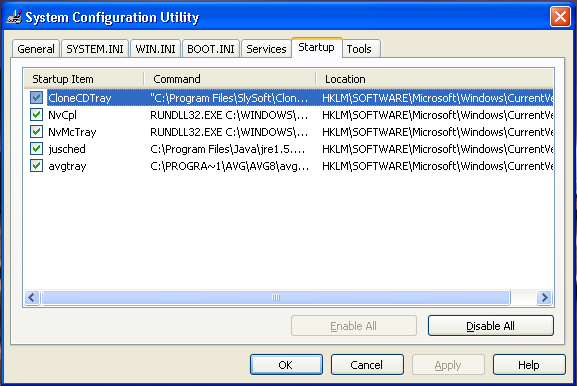
ကၽြန္ေတာ္တုိ႔ PC တစ္လုံး Error ၿဖစ္တယ္ဆုိရင္ ပထမဦးဆုံးအၾကိမ္ task manager (Ctrl + Alt+ Del) ကုိ ေခၚၾကည့္တယ္. ၿပီးရင္ ဘယ္လုိ file နဲ႔ services ေတြ Run ေနလဲ Memory usage ေတြဘယ္ေလာက္မ်ားမ်ားကုိ ဘယ္လုိ file ေတြက အသုံးၿပဳေနလဲဆုိတာကုိၾကည့္မယ္။ ၿပီးရင္ System Configuration Ultility (RUN>msconfig) က ေနဘယ္ serivces ေတြ နဲ႔ ဘယ္ဖုိင္ေတြက Operating System (Windows ) startup မွာ ၀င္ေရာက္ေနလဲဆုိတာကုိပါၾကည့္ပါ။အကယ္၍ starup မွာ ထူးထူးၿခားၿခား file အမည္ေလးေတြနဲ႔ ၀င္ေနတာေတြ႔ရင္
Code:[URL="http://vil.nai.com/vil/"]McAfee Threat Library[/URL]
Code:[URL="http://www.pacs-portal.co.uk/startup_index.htm"]Start up Programs[/URL]
Code:[URL="http://www.tasklist.org/"]Task List Org[/URL]
တုိ႔မွာသြားၿပီး ဖုိင္အမည္ကုိ ရုိက္ထည့္စစ္ေဆးၾကည့္ပါ။ ဘာေၾကာင့္လဲဆုိေတာ့ တစ္ခ်ဳိ႕ ဖုိင္ေတြက system file
ေတြနဲ႔ပုံစံတူေတြၿဖစ္ေနတတ္တယ္။ မိမိကြန္ပ်ဴတာအတြက္ အေရးမပါတဲ႔ processes ေတြကုိ end လုပ္ပါ။
System Configuration Utility
RUN dialog box မွာ msconfig ဆုိၿပီးေတာ့ ရုိက္ထည့္လုိက္ ၿပီးရင္ System Configuration Utility ဆုိတာေပၚလာမယ္... ဒါကေတာ့ Microsoft Windows မွာဆုိရင္ အေကာင္းဆုံး ကြန္ပ်ဴတာကုိၿပင္ဆင္မႈ႔ပုိင္းမွာ အေထာက္အကူၿပဳတဲ႔ utility ပဲၿဖစ္တယ္။ ေနာက္ဆုံး ဘာမွမသိဘူးပဲထား startup tab မွာ Disable All ဆုိတာကုိ ႏုိပ္မယ္။ ေနာက္ Services tab မွာ Hide All Microsoft Services ဆုိတာကုိ အမွန္ၿခစ္မယ္. ၿပီးရင္ Disable All ဆုိၿပီးႏုိပ္ restart လုပ္လုိက္ရင္ မိမိရဲ႕ ကြန္ပ်ဴတာ system ဟာပုံမွန္ထက္သိသိသာသာကုိ ေကာင္းမြန္လာတာကုိေတြ႔ရလိမ့္မယ္။ ဒီပုံစံနဲ႔ တစ္ခါတစ္ေလ ဘာ error မွန္းမသိ (အထူးသၿဖင့္ Software Conflict ၿဖစ္၍ windows normal ၀င္မရၿခင္း) တဲ႔ ၿပႆနာေတြကုိ F8 ႏုိပ္ကာ Safe Mode ထဲကေန ၿပင္ၿပီးသုံးသြားရင္ေတာင္ အဆင္ေၿပပါတယ္။
All-in-one diagnostic Tools
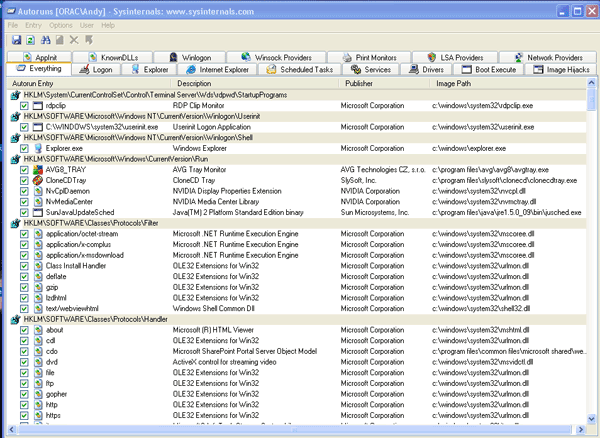
Autoruns
ဒီ software က Task manager, msconfig and the services list ေတြ စသည့္ system diagnostic အစုံပါတဲ႔ freeware ေလးတစ္ခုပါ။
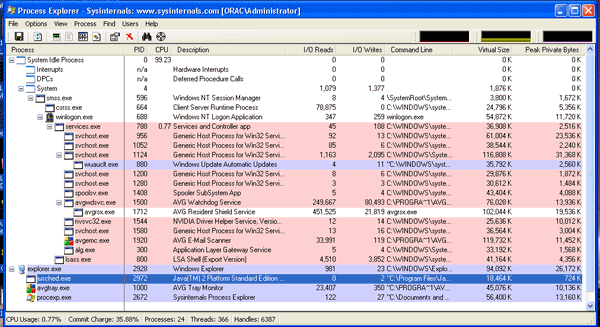
Process Explorer
ဒါေလးကေတာ့ အေပၚက ပုံစံပါပဲ.. သူ႔ရဲ႕ ထူးၿခားခ်က္ကေတာ့ file တစ္ခုၿခင္းစီအတြက္ ကုိယ္ပုိင္ ထိန္းခ်ဳပ္မႈ႔ပါ၊ CPU,IO,VM ေတြအၿပင္ performace graphed ေတြပါတယ္။
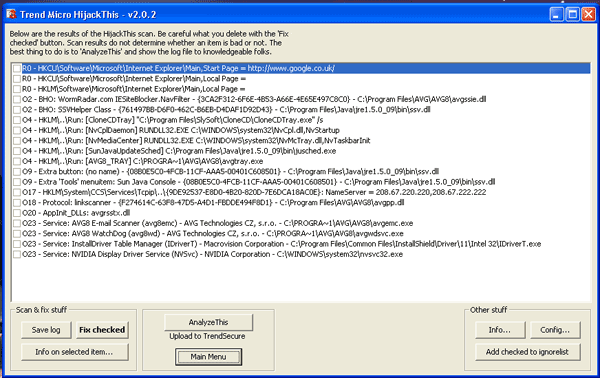
Hijack This
Technician ေတြနဲ႔ ကြန္ပ်ဴတာ နဲ႔နည္းစပ္သူေတြေတာ္ေတာ္ေတာ္မ်ားမ်ားသိၾကတဲ႔ Tool ပါ။ ဒါေပမဲ႔ ၄င္းတုိ႔မွာ ပါ၀င္တဲ႔ R0,R1,R2,R3 / F0,F1,F2,F3 / 01 / 04 / 23 စသည့္ notable entries ေလးေတြကုိ သတိမထားမိတတ္ပါဘူး။ R0,R1,R2,R3 ဆုိတာက အင္တာနက္ အြန္လုိင္း အမွားအယြင္းေတြ၊ အထူးသၿဖင့္ Internet Browser ေတြေပါ႔... အေသးစိတ္ကုိ
မွာၾကည့္ပါ။Code:[URL]http://free.antivirus.com/hijackthis/[/URL]
Malware Bytes
Antivirus Program ေတြက ၄င္းတုိ႔ရဲ႕ Virus Signiture ေတြနဲ႔ၿငိတဲ႔ ဖုိင္ေတြကုိ စစ္မယ္၊ Anti Spyware ေတြက Registry Entries မွာ ၄င္းတုိ႔ Spyware အၿဖစ္သတ္မွတ္ထားတဲ႔ ဖုိင္ေတြကုိ စစ္မယ္။ ဒါေပမဲ႔ တစ္ခ်ဳိ႕ malware ေတြကုိ antivirus ေတြ antispyware ေတြ Detect သိေသာ္ၿငားလည္း သူတုိ႔ကုိ Delete မလုပ္ဘူး( Delete လုပ္ဖုိ႔လည္း သူတုိ႔မွာ Power မရွိသလုိ၊ System File လား၊ ဘာလား မခြဲၿခားႏုိင္ၿခင္း၊ ၄င္း malware ေတြနဲ႔ familiar ၿဖစ္ေနၿခင္း)။ (မွတ္ခ်က္ - တစ္ခ်ဳိ႕ Antivirus program ေတြက အဲ႔လုိ malware ရရင္ ေတြ႔သမွ် အကုန္ဖ်က္ပါတယ္...ဘာဖုိင္မွကုိမထားပါဘူး။ ၿပီးရင္ေတာ့ စက္ေတာင္ မတက္ေတာ့ဘူး။ မိမိရဲ႕ ကြန္ပ်ဴတာက malware ကုိက္လုိ႔ ဘာမွမၿဖစ္ပဲနဲ႔ Antivirus run လုိက္မွ ေနာက္ဆုံး ရွိတဲ႔ ဖုိင္ေလးေတြပါ အကုန္ေၿပာင္သြားတတ္ပါတယ္။) ဒါေၾကာင့္ ၄င္း malware ေတြက မိမိရဲ႕ Running System နဲ႔ Applications ေတြကုိ နည္းမ်ဳိးစုံနဲ႔ဒုကၡေပး၊ application သုံးေနရင္းနဲ႔ ရုတ္တရက္ပိတ္၊ error က် အဲ႔လုိေတြၿဖစ္လာတတ္တယ္။ ဒီအတြက္ Maleware Bytes ဆုိတဲ႔ software ေလးက အဆင္ေၿပဆုံးပါ။
Download Links:
[URL="http://www.ziddu.com/downloadlink/5374197/3toolsinone.rar"]Code:[URL="http://www.planetcreator.net/downloads/4in1tool.zip"]Autoruns[/URL]
[/URL]
Code:[URL="http://www.planetcreator.net/downloads/4in1tool.zip"]Process Explorer[/URL]Code:[URL="http://www.planetcreator.net/downloads/4in1tool.zip"]HiJack This[/URL]Code:[URL="http://www.ziddu.com/downloadlink/5050007/Malwarebytes.rar"]Malware Bytes Anti Malware[/URL]
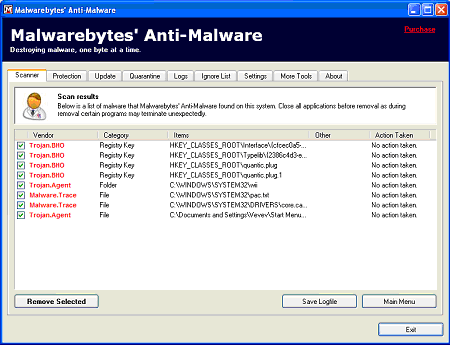
ref: mediasection / planetcreator
(ကြန္ပ်ဴတာသမားေတြ အသံုး၀င္မယ္ထင္လုိ႔ပါ ကၽြန္ေတာ္ဖတ္ျပီးေတာ့ mistery zillion forum ကယူထားတာပါ)
ဟာသပေဒသာ (၇)
> လက္ထပ္ခြင့္ပန္ၿပီးတဲ့အခ်ိန္-
>
> အမ်ိဳးသား- အင္း ေနာက္ဆံုးေတာ့လည္း အၾကာႀကီးေစာင့္ရက်ိဳးနပ္ပါတယ္
> အမ်ိဳးသမီး- ဟင္းေနာ္....ထားသြားလိုက္ရမလား?
> အမ်ိဳးသား- အမယ္ေလး စိတ္ကူးထဲေတာင္ မထည့္လိုက္ပါနဲ႔
> အမ်ိဳးသမီး-- တကယ္ ခ်စ္ရဲ ႔လားဟင္?
> အမ်ိဳးသား- ဒါေပါ့ ဒီထက္ေတာင္ပိုေသးတယ္
> အမ်ိဳးသမီး- ကၽြန္မကို အ႐ူးလုပ္မွာလား
> အမ်ိဳးသား- ဘုရားစူးရေစရဲ ႔ ဒီေမးခြန္းမ်ိဳး ေမးေတာင္မေမးပါနဲ႔လား
> အမ်ိဳးသမီး- ကၽြန္မကို နမ္းခ်င္သလား ဟင္?
> အမ်ိဳးသား- အခ်ိန္မေရြးပဲ
> အမ်ိဳးသမီး- ႏွိပ္ ေကာ ႏွိပ္စက္မွာလား?
> အမ်ိဳးသား- မင္း႐ူးမ်ား႐ူးေနလားကြာ
> အမ်ိဳးသမီး- ကၽြန္မ ေမာင့္ကို စိတ္ခ်ရပါတယ္ေနာ္?
> အမ်ိဳးသား- အင္း
> အမ်ိဳးသမီး- ေမာင္ရယ္...
>
> လက္ထပ္ၿပီးတဲ့အခါ....
>
> အေပၚက စကားေလးေတြကို ေအာက္ကေနသာ ျပန္စဖတ္လိုက္ပါ ဒီအတိုင္းပါပဲ။
Subscribe to:
Posts (Atom)